Assignments vs. Enrollments has been a longstanding pain-point within Workday Learning. This update does not rid us of all the complexity, but it helps! The ability to create assignments ad-hoc will allow us to be less reliant on campaigns and more easily push blended content that allows learners to select their specific offerings. Assignments having their own BP events will make them easier to track and notify learners of assignments.
Completing Learning Assignments
Automatically Available
In addition to business processes for creation, Workday has added a business process for learning assignment completion. End-users are unlikely to notice BUT this drastically increases admin configuration options (think BP notifications instead of configured alerts!). This also brings the overall handling of Learning Assignment Events more in line with Learning Enrollments and other Action Events throughout your tenant.
Enforce Content Order in Programs
Automatically Available
We have always been able to indicate a program content order, but not require learners to follow that cadence. Now we have the option to enforce program content order and block learners from navigating to subsequent content until prior content is completed. This is especially impactful if program content is building upon prior content, or final surveys/assessments are meant to occur in a specific sequence.
Acknowledgement Lesson Type
Automatically Available
Acknowledgements within learning have been a highly requested feature that Workday didn’t have a clean solution for, until now! With this new lesson type, we can easily include acknowledgements to our catalog on a course-by-course basis with customizable text prior to course completion.
Audience Builder Filtering and Preview
Automatically Available
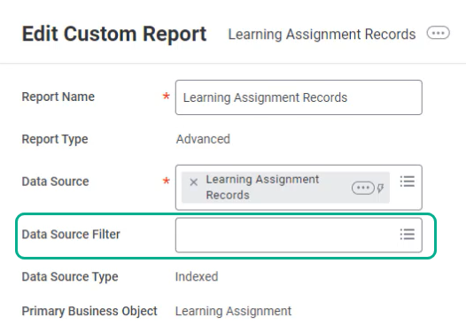
Creating audiences continues to get easier with new Audience Builder features. Audience creation now allows you to select a Data Source Filter alongside a Data Source to further streamline your audience and mimic a report building experience. Previewing your audience has also gotten more robust with the ability to add informational columns to confirm you are capturing the correct cohort.
Task Naviation for Learners
Automatically Available
Making it easier for learners to click around and explore is always a good thing. Prior to this update, navigation thru the Learning dashboard was a bit disjointed with certain tasks taking you out of the dashboard entirely. Workday has injected the pop-up modal that we are seeing sprinkled everywhere, so learners can explore without losing their place.
GenAI Learning Content Descriptions
Setup Required
Creating course descriptions can be labor-intensive with significant variance in quality & style. Enabling GenAI for learning descriptions saves time and can improve uniformity across your learning content catalog. Depending on the current status of your learning content descriptions, these AI generated summaries may prove to be clearer & more accurate, improving overall machine learning search & recommendation results.
Observational Checklist
Setup Required
Any grading guidance for Learning Assessors and Instructors likely exists outside of Workday. With this update, we have the option to bring this guidance into Workday via Observational Checklists. This new learning object is a compiled list of sections, tasks, and criteria to be used as a grading reference. For the time being, these cannot be added directly into learning content.
Skills Support on CCL
Setup Required
This update allows us to feed all possible data into Workday’s machine learning and incorporate external content more accurately into learning recommendations for career development.
Engagement Builder UI
Setup Required
If you leverage campaign reminders heavily, I would not recommend this feature just yet. However, this Engagement Builder framework in general is a drastic improvement on campaign creation & management. With updated UI and all tasks bundled together for one-stop-shopping, Engagement Builder is far and away easier to leverage that present campaign-building functionality. This functionality was released in 2025R1 but did not include the ability to configure content reminders. It still does not but this potential deal-breaker has been identified as a “What’s Coming Next” item. In the meantime, we’ve now got the ability to duplicate and enable translations.
Udacity Available in CCL Platform
Setup Required
Workday learning continues to diversify the learning content accessible to you via existing integration with CCL. This inclusion of Udacity makes it easier to accommodate and support the variety of corporate learning content decisions while maintaining Workday as your one-stop-shopping single source of truth. Great news for clients currently using or considering Udacity!
In today’s Workday Learning blog post, we discuss an option for streamlining your course catalog. Do you have courses that you offer both in-person and virtual instructor led sessions for? Or courses that you offer in multiple languages? For a variety of reasons, I frequently see multiple individual courses built to satisfy these situations. And that is an absolutely fine option. However, it is possible to combine the above scenarios onto one blended course with multiple unique offerings (In-Person and Virtual, English and Spanish). Below we will explore what that combined option looks like!
Create a Blended Course
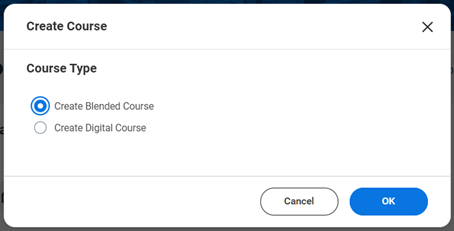
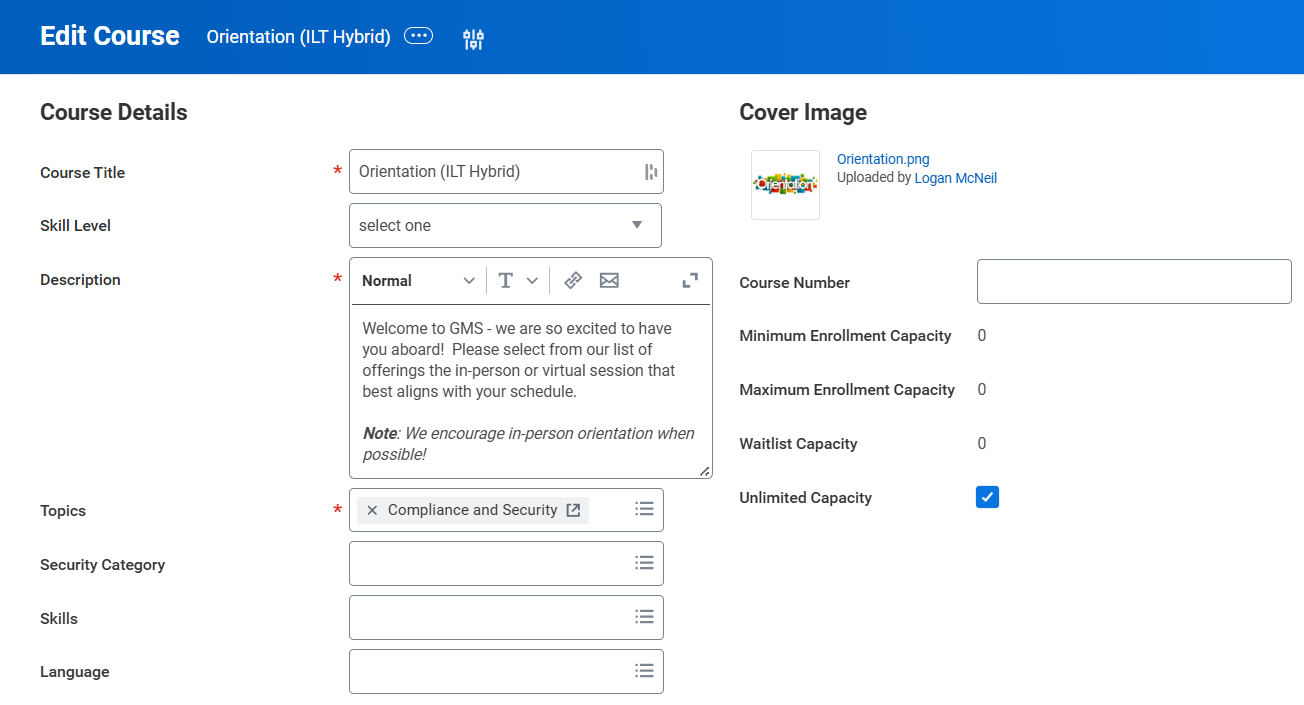
Step 1 is create a course of the Blended variety and fill out the top portion as you would normally. Title, description, topic, cover image; business as usual. The exciting part comes when we get to the lessons portion.
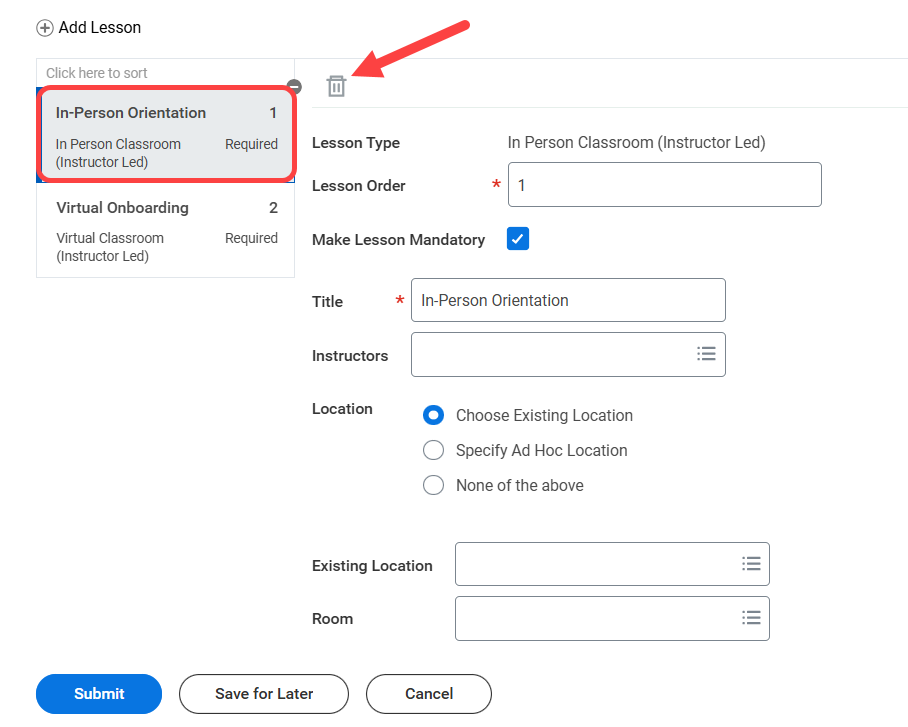
Now it’s time to include our lessons, and we are going to want to include all the offering options of interest as unique lessons. In-person Classroom (Instructor Led) AND Virtual Classroom (Instructor Led). English AND Spanish. This might feel strange at the moment but bear with me, we will not be including both lessons in each our offerings.
Schedule Offerings
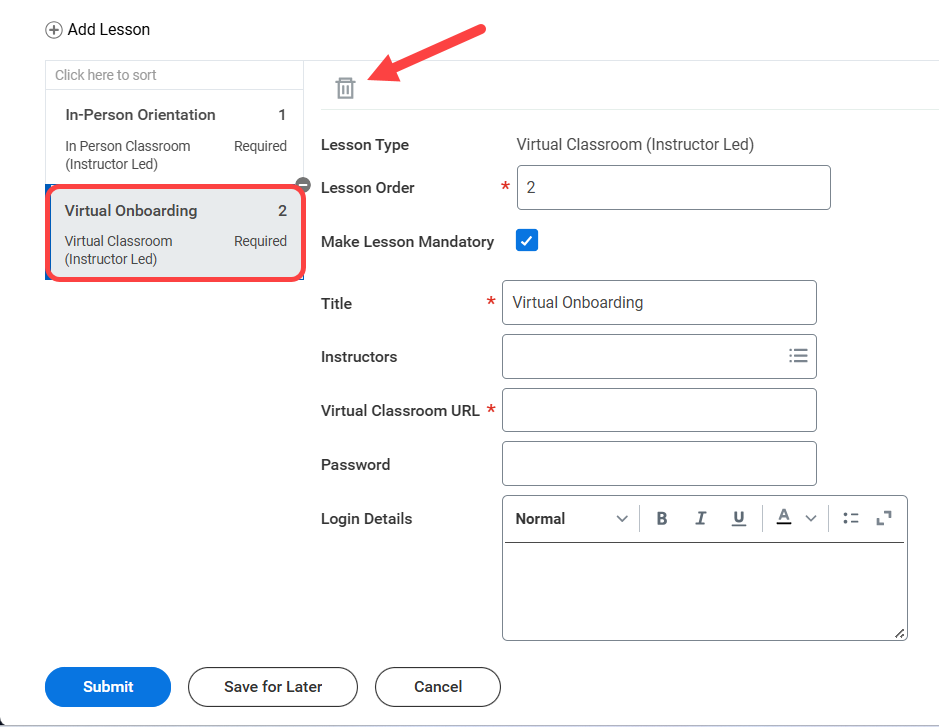
Now that our blended course with two lessons is created (Virtual and In-Person or Spanish and English, if we’re using the two examples provided above), it’s time to schedule offerings. When we go ahead and schedule offerings on this blended course, both lessons (either In-Person AND Virtual instructor-led OR English and Spanish) will be included by default. We don’t need nor want both, only one. So we will be deleting one of those lessons from the offering so only ONE lesson remains in each offering.
In this Orientation example, we create 1 offering where we’ve deleted the In-Person Orientation lesson, leaving only the Virtual Onboarding lesson. And another offering where we’ve done the reverse and deleted the Virtual Onboarding lesson, leaving only the In-Person Orientation lesson. The result? One orientation course with 2 offering options – one virtual and one in-person.
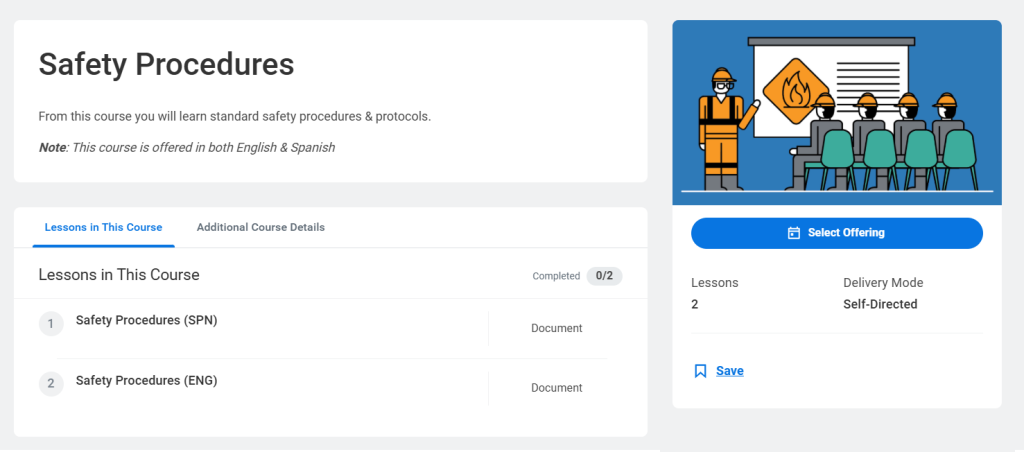
OR one Safety Procedures course with two offering options – English and Spanish.
For those that find themselves in the situation where they want their course offerings to differ by MORE than just date & time, this approach could be an excellent fit to offer as such while keeping your course catalog succinct.
Before I let you go, let me quickly call out a few things to discuss when deciding to pursue or not pursue:
When a learner is viewing the course they will see all the lessons configured from the initial blended course creation.
Any reporting done off courses (rather than course offerings) will combine these different offerings into aggregates for things like attendance and completion status.
Because these offerings stem from the same course, they will share a topic and any associated security.
This update is geared towards making the lives of Learning Admins a bit easier. Previously, Learning Admin search records were a bit hectic. The end-user experience was clean, but there wasn’t a way to hide inactive content from our learning super-users. Now our tenant looks cleaner and inactive learning content only appears to us when we’re actively searching for it.
Email Validation for External Learners
Automatically Available
Workday maintains a list of invalid email domains that is now being leveraged within External Learning User tasks as a validation rule against associating an External Learning User with an invalid email address. This validation rule will improve data accuracy for your External Learners and mitigate missed communications resulting from simple typos.
AI Summarizing Content Feedback
Automatically Available
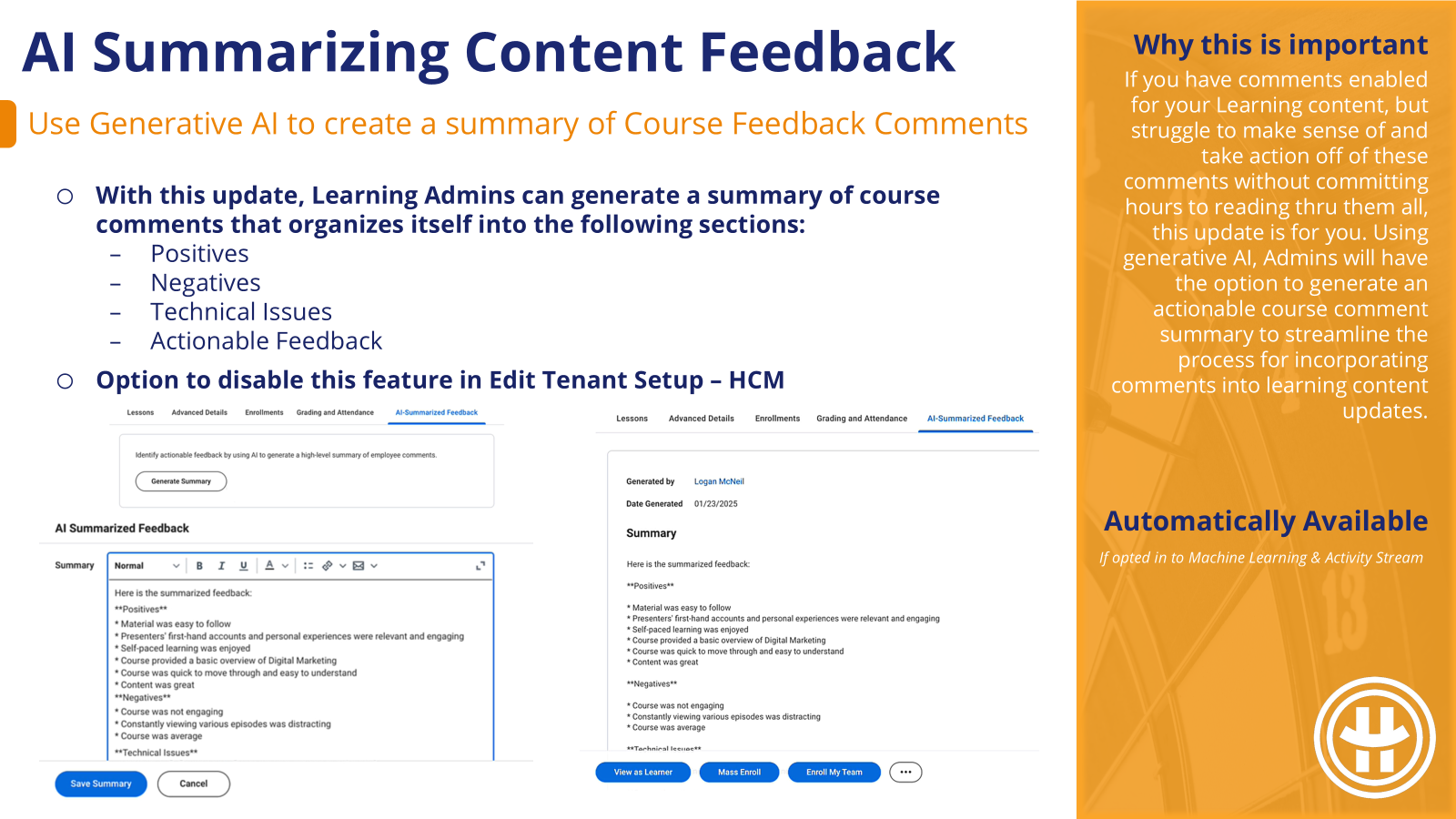
This upate is automatically available IF your organization is already opted into Machine Learning & Activity Stream (aka presently leveraging course comments). If NOT, setup is required to do those two things. But if you DO have comments enabled for your Learning content, and struggle to make sense of and take action off of these comments without committing hours to reading thru them all, this update is for you. Using generative AI, Admins will have the option to generate an actionable course comment summary to streamline the process for incorporating comments into learning content updates.
Language-Based Recommendations
Setup Required
If you have a multi-language learning catalog, chances are good that the value of learning recommendations is being limited by the language of that content recommendation. This update gives us the option to surface a language preference designation that will allow Learners to influence the language of the learning content that is pushed to them, increasing the value of recommendations.
The Enhanced CCL Platform
Setup Required
Workday’s enhanced CCL platform is intended to make it easier for 3rd party content providers to integrate with Workday Learning. This ultimately means more Learning Content options for us. It also appears to more easily outline the path to Partnership so providers you presently leverage that are not on this list could begin development of an integration to join this list. From the administrative perspective, Workday has also consolidated CCL configuration tasks into one for ease of setup.
Engagement Builder
Setup Required
Prior to Engagement Builder, the creation of learning campaigns and all its components was disjointed and not incredibly intuitive. Engagement Builder is that one-stop-shopping we’ve been looking for. However, configuring reminders has not yet been included, which might be a deal-breaker if you heavily leverage learning campaign reminders. If that’s the case, continue as you are with campaigns until that feature is included in Engagement Builder.
Did you know there’s a delivered Learning Compliance Dashboard just waiting for you in your Customer Central tenant? A suite of 26 reports spread across 4 tabs that are supposed to make your life easier when monitoring and managing learning compliance.
So what’s in this dashboard?
Use this dashboard out-of-the-box or as a starting point to iterate on. These are editable custom reports so we don’t have to start from zero. We break down the four individual tabs below:
Learning Assignments
Learning Enrollments/Dropped Content
Content Auditing
Instructor and Assessor Audit
Learning Assignments
Your lens into Required Learning. See how many learners are signed up for required content, who or what mechanism signed them up, the completion status, and any applicable expiration dates.
Reports Included:
Learning Assignments and Self-Enrollments
Learning Completion Percentage
Campaign Results
Learning Expiration Dates for External Digital Courses
Learning Assignment Details
Packaged Content & Survey Question and Answer Report
Video Interactions Question and Answer Report
Learning Enrollments & Dropped Content
Track not just required content, but all content interaction with metrics on registration statuses (enrolled, dropped, waived, etc.) and general learning consumption.
Reports Included:
Learning Enrollments/Drops by Registration Status
Learning Leaderboard by Units
Learning Enrollment and Talent Training
Learning Completion Report
On the Job Training (including Assessors)
Learning Attendance Report
Learning Certificates (Individual)
Self-Directed Learning Completion Times
Content Auditing
This tab focuses less on the learners and more on our learning catalogue. Track learning content popularity, active status, duration, ratings, and comments.
Reports Included:
Trending Learning Enrollments
Upcoming Course Offerings
Learning Content Details Report
Active/Inactive Content
Average Learning Duration by Content
Average Content Rating and Comments
Learning Content with Equivalencies
Audit Trail Report
Instructor & Assessor Audit
Aptly named, this tab helps us keep an eye on our instructors, assessors, and their offering schedules.
Reports Included:
List of Instructors
List of Assessors
Overlapping Instructor Schedules
Quick Disclaimer: Migrating things from Customer Central is not necessarily the most straight-forward task in the world, but it is easier (barely) than building all these reports yourself.
In a nutshell, you will need to hop into your Customer Central tenant, navigate to the Configuration Catalog, then migrate the delivered configuration package PKGS Learning Compliance Dashboard into whichever tenant you would like it to live. If you have internal or external support options for this adventure, I would recommend utilizing those as much as possible. They’ve likely dealt with OX and troubleshooting migration errors before.
More customization options are always welcome. Prior to this update, we were stuck with the Workday-delivered “what will you learn today?” Now, we can optionally replace that text and add a custom cover photo, making the Learning landscape more aligned with company branding. Going one step further, we can also select different header text and graphics per cohort based on conditional logic.
Enforce Lesson Sequence in Course
Automatically Available
We have always been able to indicate a lesson order, but not enforce it. Now we have that option to enforce lesson order and block learners from navigating to subsequent lessons until prior lessons are completed. This is especially impactful if lessons are building off prior lessons, or a final survey is meant to evaluate the course and all it’s lessons holistically.
Program Completion Logic
Automatically Available
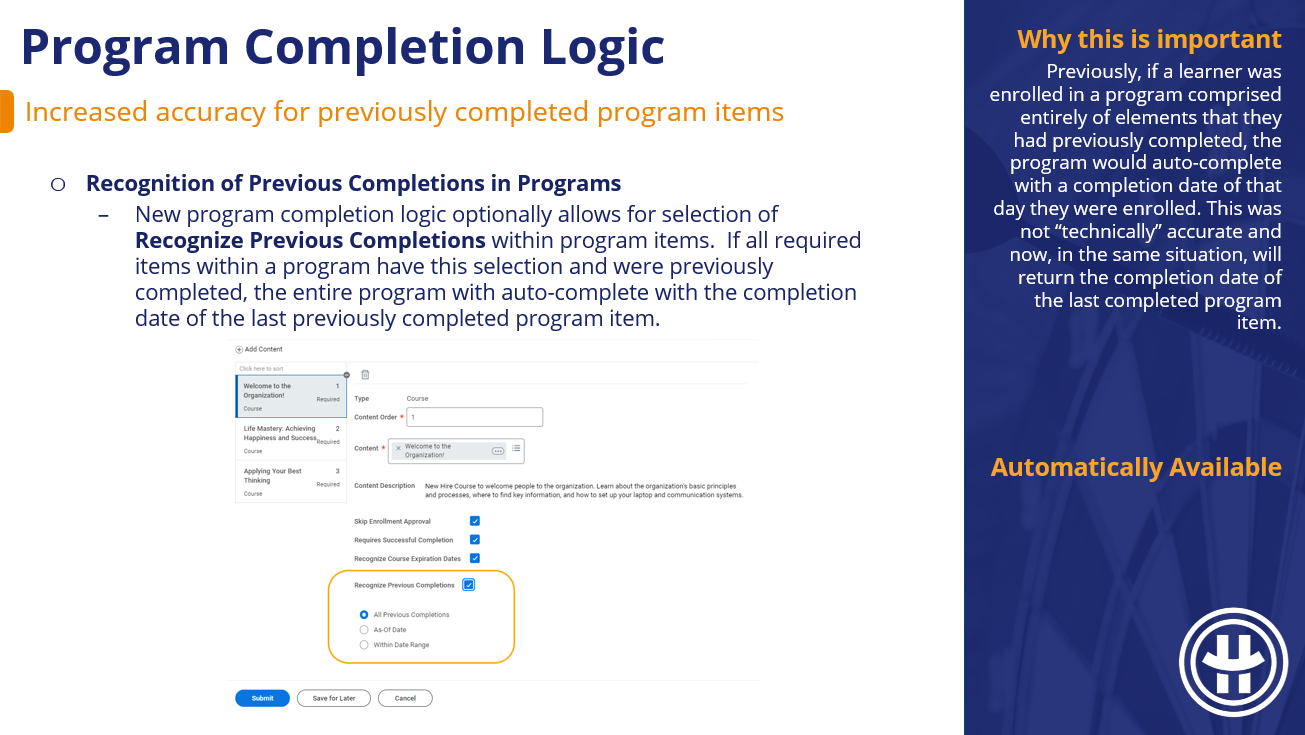
Previously, if a learner was enrolled in a program comprised entirely of elements that they had previously completed, the program would auto-complete with a completion date of that day they were enrolled. This was not “technically” accurate and now, in the same situation, will return the completion date of the last completed program item.
Assignments on Learning Content
Automatically Available
Historically, Learning Assignments have been pesky to track down. Learning Assignments result from automation such as retraining, and while they show up for the learner, they don’t show up in all the places learning enrollments do (learning transcript) until the learner takes action on them. These enhancements will make Learning Assignments much easier to keep track of and audit.
Learning Assignments Reporting
Automatically Available
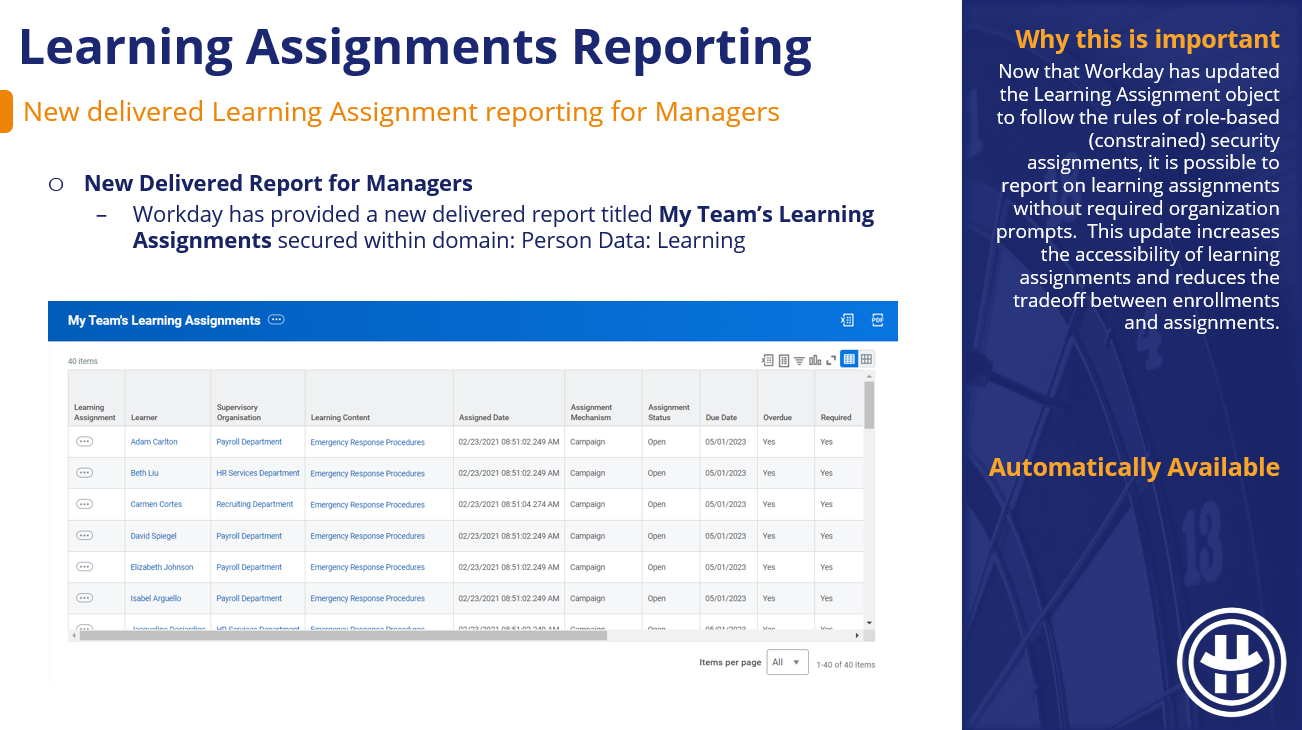
Now that Workday has updated the Learning Assignment object to follow the rules of role-based (constrained) security assignments, it is possible to report on learning assignments without required organization prompts. This update increases the accessibility of learning assignments and reduces the tradeoff between enrollments and assignments.
Assignments Security Update
Automatically Available
There is a theme this update cycle of normalizing learning assignments and access to them. To that end, learning assignments are now accessible by role-based security where previously it was only unconstrained access. Going forward, Learning Assignment reporting will no longer require data source filters, and the output will only be what end-users have access to based on their role.
Waive Assignments Security Update
Setup Required
Many places in Workday Learning’s security landscape only take user-based and unconstrained security groups, making it difficult to decentralize learning-related tasks & actions. This update will allow for role-based security groups to waive learning assignments for the cohort they support, lessening the bottleneck of who is able to waive.
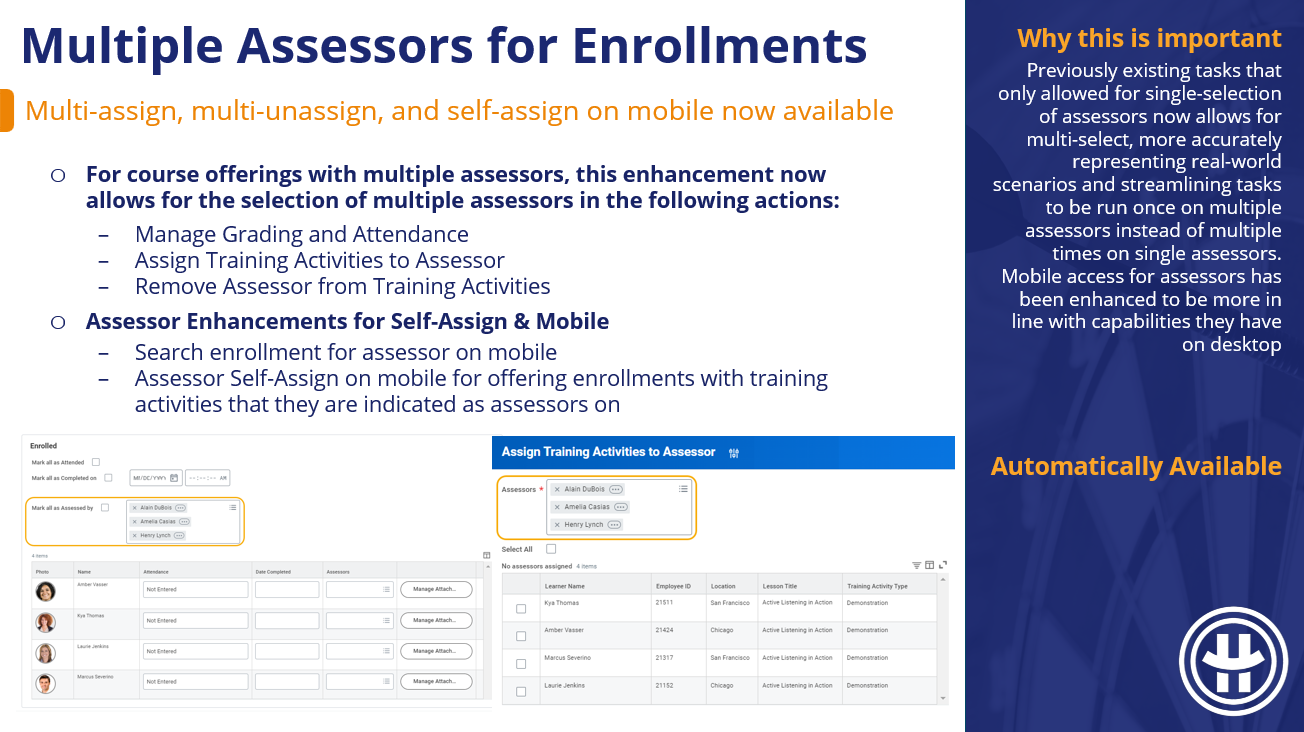
Multiple Assessors for Enrollments
Automatically Available
Previously existing tasks that only allowed for single-selection of assessors now allows for multi-select, more accurately representing real-world scenarios and streamlining tasks to be run once on multiple assessors instead of multiple times on single assessors. Mobile access for assessors has been enhanced to be more in line with capabilities they have on desktop
Internal Assessor Management
Setup Required
This update allows for greater control over who can create and/or edit internal learning assessors, as well as the new ability to inject reviews and approvals into this action. This change will also make it easier to report on these events.
Zoom Virtual Classroom Integration
Setup Required
With hybrid & remote roles remaining prevalent, the flexibility of virtual classrooms for course content is an important feature. This delivered integration with Zoom speeds up and standardizes the process of Zoom virtual classroom creation so we no longer need to (but still can) manually add virtual classroom links.
Extend Indexed Data Sources
Setup Required
I most frequently see the custom data source extension functionality leveraged when a client wants to add a facet filter to a search report that is not presently available. Workday Learning is rife with delivered search reports, but we were limited in our ability to add custom filter options. With the inclusion of Learning data sources available for extension we can now add new and custom filters to our search reports.
Skills Import for Skillsoft Percipio
Setup Required
With this update, external learning content can plug in more seamlessly to skills machine learning. Previously, (and presently for other 3rd party providers), any skill information on that course displays as a tag. This is misaligned with internal content where skills from skills cloud and maintained skills display, are searchable, and drive skill recommendations & suggestions.
Skills Import for Udemy
Setup Required
With this update, external learning content can plug in more seamlessly to skills machine learning. Previously, (and presently for other 3rd party providers), any skill information on that course displays as a tag. This is misaligned with internal content where skills from skills cloud and maintained skills display, are searchable, and drive skill recommendations & suggestions.
For part 2 of our skills cloud series, we’re going to cover the main cross-functional touch-points for Skills, and how it drives different suggestions.
The Skills touch-points we’ll cover are in the realms of Talent, Learning, Recruiting, and HCM. Most suggestions will be of skills themselves in different places on different objects, but Workday ALSO has the ability to suggest Colleagues, Learning Content, and Job Opportunities (aka Job Requisitions & Flex Teams).
Below we’ve summarized what Workday can suggest and where:
One example I like to use when talking about Skills Cloud, machine learning, and AI is Spotify (apologies to my Apple Music listeners). Spotify can push to their users any artists that they already listen to; simple and straight-forward. Spotify can also push songs & artists from the same or similar genres as the music their users listen to. Still straight-forward, but there’s a little bit of inference involved here. The fancy thing Spotify can do (which has been pretty accurate, in my experience) is identify other listeners with similar music tastes to you and suggest songs that THEY like. The connection is a bit more difficult to track since we don’t have access to all this data in bulk (nor perhaps the processing power to analyze it) but the resulting suggestions can be impressively accurate.
Loosely, Workday’s suggestions are doing something similar. Workday is looking at all the data at its disposal and making straight-line or dotted-line connections from object to skill or object to object. It’s just a bit more fun to talk about in terms of music.
Let’s dive into some of the places skills can show up, and the role they can play in the larger picture. As an aside, I’ll intermittently call out decisions we can make around skill functionality; by-and-large that decision is a check box in Maintain Skills and Experience Setup.
Talent
Worker Skills
Lets start with the most well-known one. Skills on a worker. Individuals can select skills they have, or skills they would like to have. The songs on your playlist, if you will.
At this point, Workday can begin to identify other workers that are “similar” to you based on the skills that they have and are interested in. Workday can also reference objects like job profiles and supervisory organizations when looking for similarities.
Connections & Mentors
Via the Connections & Mentors functionality (pictured below in Career Hub) Workday can create dotted-line connections between workers. Workers that are similar to you or workers that have something you want. This one is a slightly different suggestion of People rather than Skills.
Learning
Learning Content
The suggestions on Learning Content are two-fold. Within the Skills drop-down is a category of Recommended Skills where Workday will make suggestions of Skills to include on this content. In addition, Workday can also take this Learning Content and suggest it to Learners based on their interests and learning behavior.
Recruiting
Internal Candidate Skills
When you apply internally, applicants can leverage skills cloud & skill suggestions in much the same way they do on their worker profile. Optionally, an internal applicant can update the skills on their worker profile with any changes they’ve made in their job application so these two places remain in sync (this capability is new-er).
External Candidate Skills
External applicants function a little differently with regards to skills. You can optionally allow skills cloud to be accessible to your external candidates, but it won’t make skill suggestions (I assume because Workday doesn’t have much data on them at this point). The value in opening up skills cloud to external candidates (in excess of clean data and seemingly unlimited skill selection options) is that upon hire this information transfers over to a new hire’s worker profile.
Job Requisitions & Flex Teams
Add required and optional skills directly to your job requisitions & flex teams (gigs) for clarity on the role, and direct influence in how it is promoted to applicants. If a worker has skills that this job requisition/flex team professes to need, it’s more likely to be pushed to them as an opportunity that matches their skill set. In absence of direct skills applied, Workday can leverage the free-text descriptions and/or job profiles to make skill inferences.
HCM
Job Profiles
At this point, it’s becoming clear that we can sprinkle skills in A LOT of different places. The final object we will cover is Job Profiles. For Job Profiles, the information lives amidst other Qualifications, and you can add additional skill data for Required vs. Optional and Skill Level (more on Skill Levels to come in our Skills part 3 post).
If you want to add skills to Job Profiles in bulk, this effort has recently become MUCH easier. This will likely be it’s own Skills post, but the involved parties are the delivered report Suggested Skills for Job Profile and the mass action Edit Skills for Job Profiles.
There is so much to cover within the realm of skills. I hope this overview has left you with more clarity and fewer questions. If that’s NOT the case, or if you have suggestions for the next deep-dive skills topic, don’t hesitate to drop a comment in the link below!
What’s Automatically Available in Learning 2024 R1?
What’s Automatically Available in Learning 2024 R1?
A lot! We’ve got six automatically available updates with the general theme being efficiency and data availability. Less digging for the tasks and information you need, less manual effort to perform actions in bulk. Let’s take a look at what’s showing up in your Production tenant!
In the spirit of providing more relevant information on offering tables during enrollments, Workday has updated the offerings table for the following enrollment tasks:
Learning Facilitated Enroll
Learning Mass Enroll (Mass Enroll button)
Manager Enroll (Enroll My Team button)
Mass Enroll by Role
Updates include:
Combining seats available & capacity into one Availability column
Cost & Version display if and only if there are values populating
Location now displays the location of the lesson, rather than the primary location
Offering Number column displays a unique ID to differentiate between offerings
Select Offering Redesign – Learners
Like the redesign for Admins & Managers, the focus here for Learners is more relevant information, front & center. When selecting an offering, the offerings are now automatically sorted by start date and available capacity. Lesson location, cost, and version are included in the table if applicable, and there is a back/review button to toggle between a selected lesson and the general offering screen. Workday has also incorporated their “pop-up modal” that we’re seeing sprinkled across a few functional areas (thinking goals). The Select Offering, Review & Confirm screens no longer navigate you to a new page.
Initial Assignment & Retrain Window
The retrain window functionality has historically been a bit confusing and counter-intuitive. This update aims to inject clarity and reduce duplicative completions. The below two scenarios outline expected behavior:
If a learner completes an initial assignment inside of the retrain window, the next expiration date (not the current) will apply for their retraining assignment
If a learner completes their initial assignment outside of the retrain window, the current expiration date will apply for their retraining assignment.
Get Learning Courses Web Service
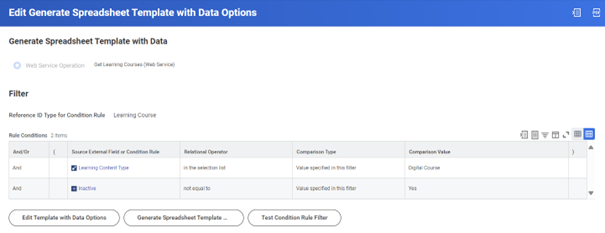
It is now possible to generate the Manage Learning Course EIB with data! At the moment this is not applicable for Programs, but blended and digital courses are fair game. Historically, this EIB was not an efficient option because it would clear out any existing course information that wasn’t explicitly included. Without the ability to populate the spreadsheet with data, that effort was incredibly time consuming. Going forward, making edits to courses in bulk can be much more efficient.
Mass Enroll in Course Offering
Short, sweet, and to-the-point. Workday has made it easier to enroll learners into a course offering in bulk. The pathway to follow from the related actions of a course offering is Course > Mass Enroll.
Mass Drop Program Enrollments
Sticking with the theme of actions done in bulk, Workday automatically delivers the ability for Administrators to mass drop learners from programs.